


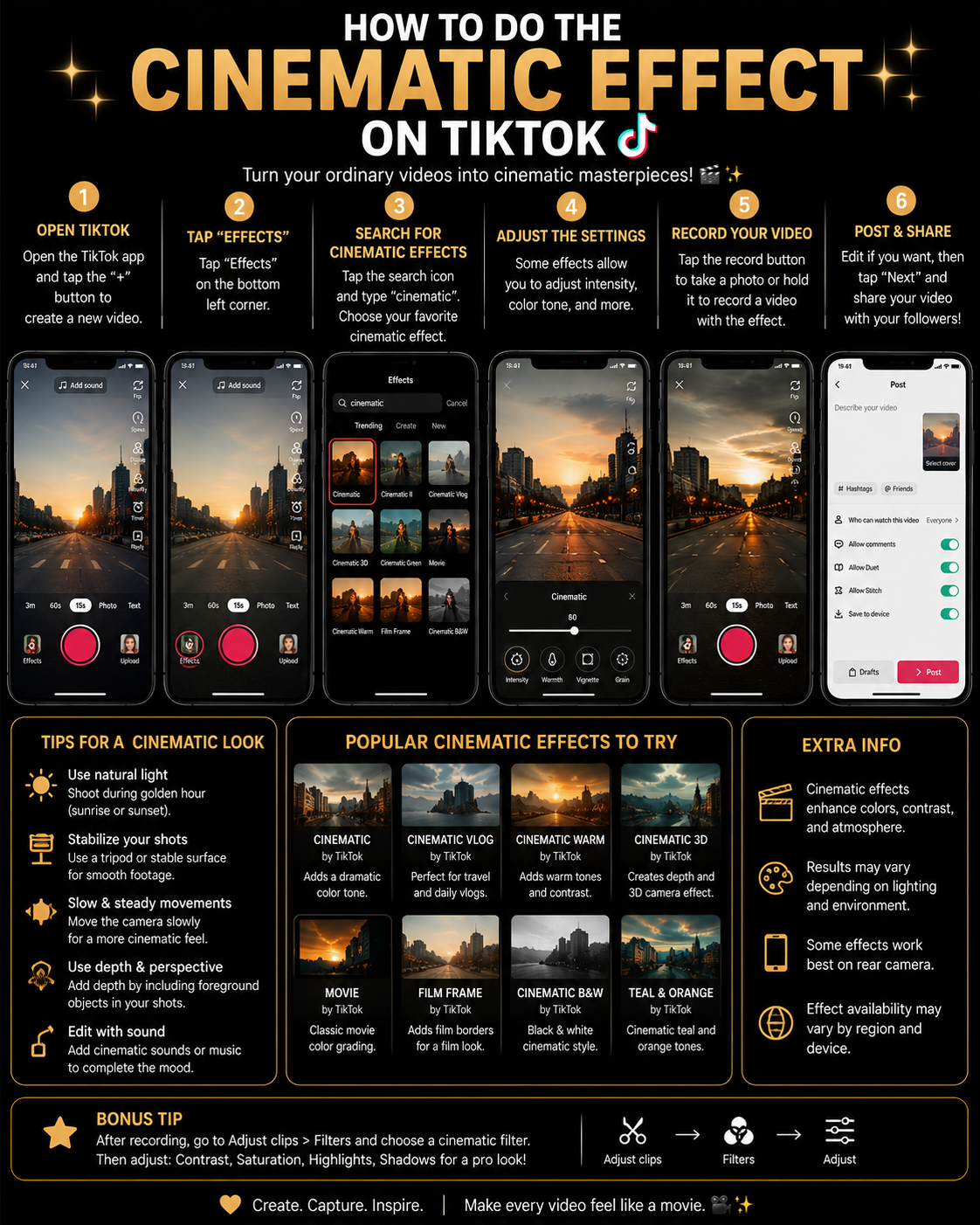
The Cinematic effect on TikTok is not necessarily one permanent filter with a single official name. Instead, it describes a visual style created through a combination of controlled camera movement, deliberate lighting, cinematic framing, color filters, slow motion, speed changes, sound design, transitions, overlays, and careful editing. Some TikTok effects can produce an instant film inspired appearance, but the most convincing cinematic videos usually combine several simple techniques rather than depending entirely on one effect.
A cinematic TikTok might use darker shadows, warmer highlights, a widescreen composition, shallow focus, stabilized movement, atmospheric music, and a carefully timed sequence of short clips. Another video may create a cinematic feeling through dramatic black and white color, slow motion, ambient sound, and a strong emotional story. The visual style can therefore change according to the subject, but the underlying principle remains the same: every camera movement, cut, sound, and color choice should feel intentional. 🎥
TikTok’s official Effects and Filters guide explains that filters can be added before or after recording or uploading, while their strength can be adjusted through the filter intensity slider. TikTok’s video and photo editing guide also describes advanced editing tools such as multitrack editing, overlays, video effects, sound effects, and automatic Magic editing styles.
Definitions 🧠
Cinematic effect: A visual and auditory treatment that gives a short video the atmosphere, composition, pacing, and emotional quality associated with a professionally produced film.
Cinematic filter: A color preset that changes the tone of a video by adjusting warmth, contrast, saturation, shadows, highlights, or color balance. A filter can support a cinematic appearance, but it cannot replace good lighting, framing, and editing.
Color grading: The process of adjusting colors and brightness to create a consistent mood. Warm orange tones may produce a nostalgic feeling, cool blue tones may suggest tension, and reduced saturation may create a serious or reflective atmosphere.
Aspect ratio: The relationship between the width and height of a video. TikTok is designed primarily for vertical 9:16 video, although creators sometimes add horizontal black bars to imitate a wider film frame.
Frame rate: The number of individual frames recorded every second. Standard video commonly uses 24, 25, or 30 frames per second, while higher frame rates such as 60 or 120 frames per second can produce smoother slow motion.
B roll: Supporting footage that shows details, locations, objects, hands, movement, or atmosphere while the main story continues. Examples include a close up of coffee being poured, shoes walking on wet pavement, sunlight through a window, or hands opening a package.
Shot sequence: A group of clips arranged to show an action from several perspectives. A simple sequence might contain a wide shot, a medium shot, and a close up.
Sound design: The intentional use of music, ambient sound, footsteps, wind, doors, fabric movement, traffic, or other audio details to strengthen the visual story.
Why the Cinematic Effect Matters 🎯
Cinematic styling can transform an ordinary moment into a short visual story. A walk through the city, a morning coffee, a product package, a restaurant visit, or a simple outfit can feel more meaningful when the creator controls the composition, lighting, movement, color, and sound. The subject does not need to be extraordinary because cinematic presentation can help viewers notice details they would normally ignore.
This style is valuable for travel videos, fashion content, product demonstrations, food videos, personal storytelling, automotive clips, fitness edits, wedding content, real estate tours, music promotion, and brand campaigns. It can also improve audience retention because a sequence of carefully varied shots gives viewers a reason to continue watching.
A cinematic effect is like punctuation in visual language. A close up functions like an underline, a slow movement creates a pause, a sudden cut acts like an exclamation mark, and silence can become as meaningful as music. When these elements work together, the video feels designed rather than randomly recorded. 🎭
How to Apply the Cinematic Effect 🛠️
Method 1: Search for a Cinematic Effect or Filter 🔎
This is the fastest method when you want an immediate film inspired appearance inside TikTok.
1. Open TikTok and tap the Add Post + button.
2. Tap Effects near the recording button.
3. Open the effect search option when it appears.
4. Search several related phrases because effect names are not standardized:
- Cinematic
- Movie
- Film Look
- Movie Scene
- Film Camera
- Vintage Film
- 35mm
- Film Grain
- Black Bars
- Anamorphic
- Old Movie
- Movie Color
5. Preview several effects before choosing one.
6. Move the camera and subject during the preview to check whether grain, light leaks, black bars, or other visual elements remain stable.
7. Save the effect to Favorites when you find a suitable option.
8. Record a test clip and review it before filming the complete sequence.
An effect may add grain, black bars, lens flares, light leaks, or film style color, but these elements should support the subject rather than cover important details. A subtle film treatment normally looks more professional than an effect that adds several dramatic overlays simultaneously.
Method 2: Use TikTok Filters for Cinematic Color 🌈
TikTok filters can be applied before or after recording or uploading, which makes them useful for creating consistent color across several clips.
1. Open the TikTok camera.
2. Tap Filters in the side panel.
3. Compare the available portrait, landscape, food, and atmosphere options shown in your version.
4. Choose a filter that matches the intended mood.
5. Adjust the intensity with the slider above the filter panel.
6. Apply the same filter strength to clips recorded under similar lighting.
7. Check skin tones, white objects, product colors, and shadows before publishing.
For a warm nostalgic scene, choose a filter that gently warms the highlights and reduces harsh contrast. For a mysterious night sequence, try cooler shadows and restrained saturation. For a clean commercial video, preserve neutral colors and increase contrast only slightly.
Method 3: Record a Cinematic Shot Sequence 🎥
A cinematic video becomes more interesting when one action is shown from several perspectives rather than through one continuous shot.
1. Begin with a wide shot that establishes the location.
2. Record a medium shot showing the subject and action more clearly.
3. Capture a close up of an important detail.
4. Add a movement shot, such as walking past the camera or following the subject.
5. Record an environmental detail to create atmosphere.
6. Capture each shot for several seconds, even if you plan to use only one second in the final edit.
For example, a cinematic coffee video might begin with a wide shot of the kitchen, continue with a medium shot of the person approaching the counter, show a close up of coffee beans, capture hot water being poured, and finish with steam rising from the cup beside a window. The ordinary action becomes a complete visual sequence because each shot contributes new information.
Method 4: Use Controlled Camera Movement 🚶
Smooth movement creates energy without making the video feel chaotic.
1. Hold the phone with both hands and keep your elbows close to your body.
2. Bend your knees slightly while walking to reduce vertical movement.
3. Move slowly and deliberately rather than attempting a fast sweeping motion.
4. Use a tripod, stabilizer, or fixed surface for static shots.
5. Try simple movements such as a slow push toward the subject, a pull away, a sideways slide, or a gentle reveal from behind an object.
6. Avoid digital zoom during recording when it significantly reduces quality.
Camera movement should have a purpose. Moving closer can emphasize emotion or detail, while moving away can reveal context. A sideways motion can introduce a location, and a static shot can create calm or tension.
Method 5: Use Slow Motion for Important Moments 🐢
Slow motion can make fabric movement, hair, water, smoke, sports, walking, product reveals, and emotional expressions feel more cinematic.
1. Record with your phone’s high frame rate or Slow Motion mode when possible.
2. Use bright lighting because high frame rate recording generally requires more light.
3. Upload the clip to TikTok.
4. Open the editing tools and adjust the clip speed where the option is available.
5. Slow only the most important section instead of making the entire video slow.
6. Align the slow section with an emotional musical moment or sound change.
Normal low frame rate footage may become choppy when slowed dramatically. Recording at a higher frame rate gives TikTok or another editor more frames to display during slow playback.
Method 6: Build the Video with TikTok’s Advanced Editor ✂️
TikTok’s editing tools support multiple clips, overlays, video effects, sound effects, and multitrack editing.
1. Record or upload your clips.
2. Tap Continue and open the editing tools.
3. Arrange the clips according to the visual story rather than only the order in which they were recorded.
4. Trim unnecessary pauses from the beginning and end of every clip.
5. Alternate between wide, medium, and close shots.
6. Add overlays when you need an additional visual layer.
7. Use video effects only at moments where they support the story.
8. Add sound effects that match visible actions.
9. Preview the complete timeline several times before continuing.
Most cinematic TikToks benefit from short clips lasting approximately half a second to three seconds, although emotional or atmospheric scenes may need longer shots. The correct duration depends on the music, action, and intended mood.
Method 7: Try TikTok’s Magic Editing Tool 🪄
TikTok’s Magic tool can automatically apply video and audio effects to uploaded or recorded clips.
1. Record or upload your footage.
2. Continue to the editing screen.
3. Tap Magic at the bottom.
4. Select an editing style.
5. Preview the automatically added video and audio effects.
6. Tap the style again when you want to replay the preview.
7. Tap the Continue button to save the edit.
Automatic editing can provide a useful starting point, particularly when you have several clips but do not know how to arrange them. However, review every cut because the automatic tool may not identify the emotional or visual moment you consider most important.
Method 8: Add Cinematic Sound Design 🎧
A video can look beautiful and still feel incomplete when the audio lacks depth. Sound gives visual actions weight and helps establish location.
1. Choose music that matches the intended mood.
2. Preserve useful natural sounds from the original footage.
3. Add sound effects for footsteps, doors, fabric, camera movements, rain, wind, vehicles, or object placement where appropriate.
4. Lower the music slightly when important ambient sound or speech begins.
5. Align visible actions with the corresponding sounds.
6. Use silence before an important moment to make the next sound feel stronger.
A close up of a cup touching a table becomes more believable when viewers hear the contact. A walking scene feels more immersive with footsteps and street ambience. Sound design should remain subtle enough that viewers experience it without becoming distracted by it.
Cinematic Method Comparison 📊
| Creative Goal | Recommended Method | Main Advantage | Main Limitation |
|---|---|---|---|
| Create an instant film look | Search TikTok Effects | Fast and simple to preview | May look artificial when the effect is too strong |
| Create consistent cinematic color | Use TikTok Filters | Filter strength can be adjusted | Cannot correct weak framing or lighting |
| Tell a visual story | Record wide, medium, and close shots | Creates variety and narrative structure | Requires planning and multiple recordings |
| Create smooth visual energy | Use controlled camera movement | Makes the viewer feel present in the scene | Handheld movement may become shaky |
| Emphasize a specific moment | Use high frame rate slow motion | Highlights movement and emotion | Requires adequate lighting |
| Arrange a complete sequence | Use TikTok’s advanced editor | Supports clips, overlays, effects, and audio | Requires more editing time |
| Create a fast automatic edit | Use the Magic tool | Adds video and audio effects automatically | Provides less control over individual cuts |
Cinematic TikTok Workflow Diagram 🧩
Choose the mood and story
          |
          v
Plan wide, medium, and close shots
          |
          v
Record with stable, deliberate movement
          |
          v
Upload clips to TikTok
          |
          v
Trim and arrange the sequence
          |
          v
Apply one consistent filter
          |
          v
Add music, ambient audio, and sound effects
          |
          v
Preview color, timing, and transitions
          |
          v
Publish the cinematic TikTok
How to Make TikTok Videos Look More Cinematic ✨
Clean the Camera Lens
A fingerprint on the lens creates haze, reduces contrast, and makes lights appear smeared. Cleaning the lens with a soft cloth is one of the simplest ways to improve video quality.
Use the Rear Camera When Possible
The rear camera often provides better detail, stabilization, dynamic range, and lens choices than the front camera. Use the front camera when you need to monitor framing, but compare both before recording an important sequence.
Control the Lighting
Record near a window, during early morning, or shortly before sunset for softer light. Avoid mixing several different light colors unless the contrast is intentional. Bright white ceiling lights combined with warm lamps can create inconsistent skin tones.
Lock Focus and Exposure
When your phone camera allows it, lock focus and exposure on the main subject so brightness does not shift dramatically during the shot. Sudden exposure changes can make a smooth movement look amateurish.
Keep the Background Intentional
Remove distracting objects that do not contribute to the scene. Use doorways, windows, furniture, streets, trees, or architectural lines to frame the subject naturally.
Create Foreground Depth
Record through leaves, a doorway, glass, fabric, or another foreground object to give the image multiple visual layers. The foreground should support the composition rather than hide the subject.
Use Directional Movement
When one clip ends with movement from left to right, begin the next clip with movement in a similar direction. Consistent screen direction helps the sequence flow naturally.
Cut on Action
Change shots while an action is happening, such as opening a door, sitting down, turning the head, lifting an object, or taking a step. The movement distracts the viewer from the cut and makes the transition feel smoother.
Use Black Bars Carefully
Horizontal bars may suggest a widescreen film frame, but they also reduce usable screen space on a vertical platform. Use them when they support a deliberate visual concept rather than assuming they automatically make every video cinematic.
Avoid Excessive Film Grain
A small amount of grain can create texture, but heavy grain may become more visible after TikTok compression and reduce facial or product detail. Preview the final upload whenever possible.
Practical Example: Cinematic Morning Coffee TikTok ☕🎬
Imagine that you want to turn an ordinary morning coffee routine into a twelve second cinematic TikTok. You begin with a wide shot of the kitchen illuminated by soft window light. The second shot shows your hand opening the coffee container, followed by a close up of the beans, a side view of water pouring, and a detailed shot of steam rising from the cup.
You keep the phone stable, move slowly during the pouring shot, and record each action from more than one angle. In TikTok’s editor, you trim the clips so no shot feels unnecessarily long, place the strongest close up on the musical beat, and apply one warm filter at moderate intensity across the sequence.
You retain the natural sound of the container opening, the beans falling, the water pouring, and the cup touching the table. The music remains quiet enough for those sounds to remain audible. The final shot shows the cup beside the window while the camera slowly moves backward. Nothing extraordinary happens, but the controlled detail, color, pacing, and sound transform the routine into a short visual story.
A Short Anecdote ☕
I have seen creators search for the strongest possible cinematic filter because their video did not feel like a film, even though the real problem was that the entire scene had been recorded from one static angle. After they added a wide shot, two close ups, a slow movement, and natural sound, the video immediately felt more polished even with a very subtle filter. The experience demonstrates that cinematic style is built through visual decisions, while the filter acts only as the final layer.
Personal Workflow 🙂
For a cinematic TikTok, I would begin by identifying one simple story and dividing it into an opening, middle, and closing moment. I would record more detail shots than I expect to use, keep the phone stable, and capture natural audio separately when necessary. During editing, I would remove every clip that repeats information, choose one consistent filter, and reduce its intensity until the colors feel intentional but believable.
I would then add music and sound effects only after the visual sequence works without them. This helps prevent the music from hiding weak pacing. Finally, I would watch the complete video once with sound and once without sound. If the story remains understandable without audio and feels richer when the sound returns, the visual and auditory elements are supporting one another effectively.
Common Cinematic Effect Mistakes ⚠️
Using every effect at once: Film grain, light leaks, black bars, lens flare, blur, color filters, and transitions can overwhelm a short video when applied simultaneously.
Recording only one angle: A cinematic sequence usually needs visual variety. Capture wide shots, close ups, and environmental details.
Moving the camera without purpose: Constant movement can make viewers feel disoriented. Use movement to reveal, follow, or emphasize something.
Ignoring sound: Music alone may not create immersion. Natural sounds and carefully placed effects can make the scene feel more physical and believable.
Making every shot slow motion: Slow motion is most effective when contrasted with normal speed footage and reserved for important moments.
Using an extremely strong filter: Excessive contrast or color can destroy skin tones, hide shadow detail, and make products appear inaccurate.
Leaving unnecessary pauses: Long empty moments can weaken a short video unless silence and stillness are part of the intended mood.
Frequently Asked Questions 🤓
1. Does TikTok have one official Cinematic effect?
TikTok has a changing collection of effects and filters rather than guaranteeing one permanent Cinematic effect for every account. Search several related terms and compare the available options.
2. Can I add a cinematic filter after recording?
Yes. TikTok states that filters can be applied before or after recording or uploading, and their intensity can be adjusted.
3. How do I save a cinematic effect?
Open the effect in TikTok and tap the Favorites button in the effects panel while the effect remains available.
4. Why does my cinematic video look shaky?
Hand movement becomes more noticeable during slow camera moves. Hold the phone with both hands, move carefully, or use a tripod or stabilizer.
5. Should I record at 24 or 30 frames per second?
Both can work. Twenty four frames per second is commonly associated with film motion, while thirty frames per second can look slightly smoother and is practical for social video.
6. What frame rate is best for slow motion?
Use 60, 120, or a higher supported frame rate when you plan to slow footage significantly. Higher frame rates generally need more light.
7. Do black bars automatically make a video cinematic?
No. They change the frame presentation, but lighting, composition, movement, editing, color, and sound have a much greater influence.
8. Can TikTok automatically create a cinematic edit?
The Magic tool can automatically add video and audio effects, although the available styles and selected cuts may not match every creator’s intended story.
9. Why does my filter look different after posting?
TikTok compression, screen brightness, device color processing, and upload quality can change the appearance slightly. Avoid extreme filter settings and upload the highest quality original available.
10. Can I make a cinematic TikTok without another application?
Yes. TikTok provides effects, filters, multitrack editing, overlays, video effects, sound effects, and Magic editing. Another editor is optional when you need more advanced color or motion control.
People Also Asked 🔎
What makes a TikTok video look like a movie?
Intentional lighting, varied shot sizes, controlled movement, consistent color, selective slow motion, precise editing, and detailed sound design create the strongest film inspired appearance.
What is the best TikTok filter for cinematic videos?
There is no universal best filter because the correct choice depends on lighting, subject, skin tone, location, and mood. Select a filter that supports the scene and reduce its intensity when colors become unnatural.
How long should a cinematic TikTok be?
The video should be long enough to complete its visual idea without repeating information. A focused sequence may work in eight to fifteen seconds, while a narrative may need longer.
Can a phone create genuinely cinematic footage?
Yes. Modern phones can produce strong footage when the creator controls lighting, focus, exposure, framing, movement, and editing. Technique usually matters more than expensive equipment.
What content works best with cinematic editing?
Travel, food, fashion, daily routines, product videos, vehicles, architecture, fitness, nature, events, music, and personal storytelling all work well when built around a clear visual idea.
Conclusion ✅
To create the Cinematic effect on TikTok, begin by choosing a clear mood and simple visual story. Search TikTok’s Effects library for terms such as Cinematic, Film Look, Movie, Film Grain, or 35mm when you want an immediate style, and use TikTok Filters at moderate intensity to create consistent color. Record a variety of wide, medium, and close shots, keep camera movement controlled, use slow motion selectively, and arrange the clips through TikTok’s advanced editing tools.
Add music, natural ambience, and carefully timed sound effects to give the visuals depth, or try TikTok’s Magic tool when you want an automatic starting point. The most convincing cinematic video does not depend on dramatic black bars or an extremely strong filter. It comes from thoughtful lighting, stable framing, purposeful movement, visual variety, accurate timing, consistent color, and sound that supports every important action. 🎬✨