


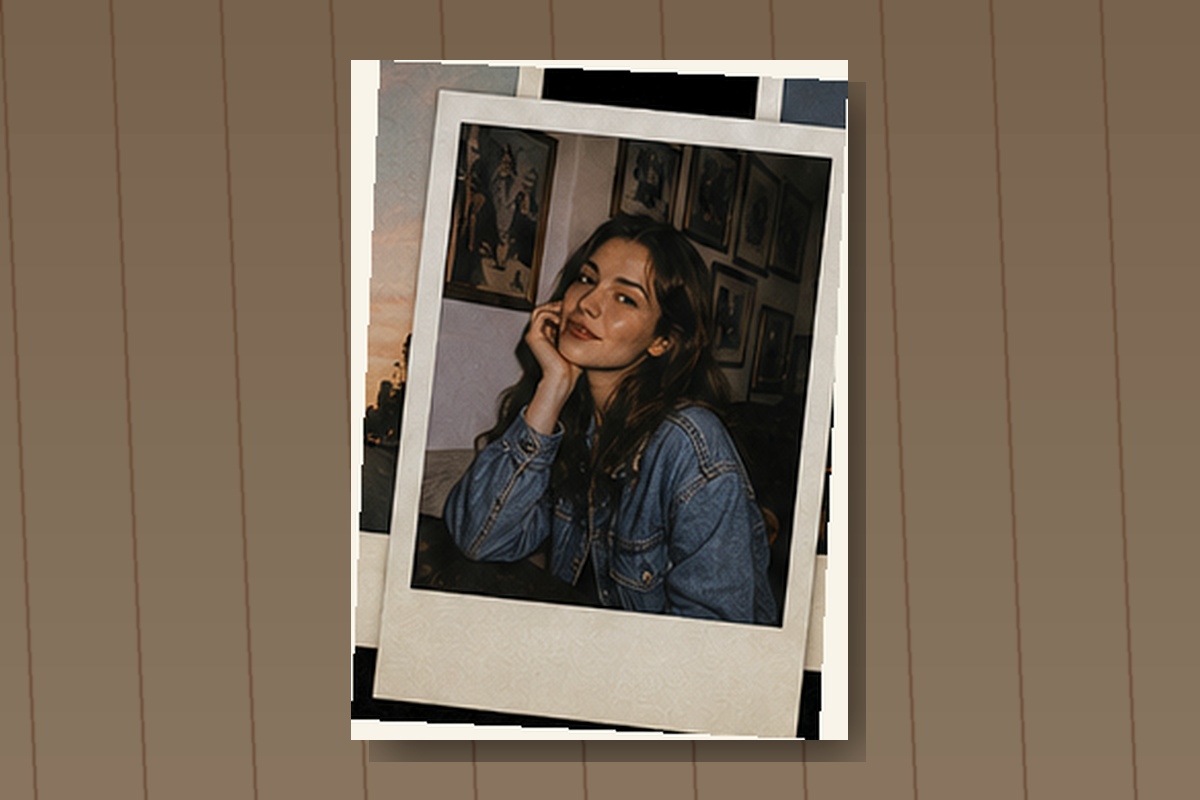
You can create the effect directly in TikTok when a suitable effect or filter is available, build it manually with TikTok’s text, sticker, photo, and editing tools, or prepare a more detailed version in CapCut, Adobe Express, Canva, Photoshop, or another image and video editor before uploading it. TikTok’s official effects and filters guidance explains that effects may be available before or after recording, while filters can be added before or after recording or uploading and adjusted with an intensity slider. This means you can create a simple instant film inspired style inside TikTok even when your account does not display an effect specifically called “Polaroid.”
The exact effect names, available templates, editing buttons, and interface positions can differ according to your device, TikTok version, account, and region, so it is better to understand the visual ingredients of the style instead of depending entirely on one temporary effect. Search results may include names such as Polaroid, instant camera, instant film, retro photo, vintage frame, photo booth, film camera, old photo, or memory frame.
Definitions: What Is the Polaroid Effect? 📷
The Polaroid effect is a digital visual style inspired by instant photographs that develop shortly after being captured. In popular visual culture, an instant photograph is generally associated with a square or nearly square image placed inside a white paper frame, with a noticeably wider blank area beneath the image. That lower space is often used for a handwritten date, location, short message, name, or personal note.
The effect usually includes more than a white border. A convincing Polaroid style may contain slightly muted colors, warm skin tones, faded black areas, creamy highlights, subtle vignetting, gentle film grain, minor softness, small exposure variations, and a faint color cast. Some versions imitate a newly developed instant photograph with bright colors and clean paper, while others imitate a photograph that has remained inside an album, wallet, drawer, or memory box for many years.
The Polaroid effect is not the same as a general vintage filter. A vintage filter may change only the colors, contrast, and grain of an image, while a recognizable Polaroid design normally includes the physical appearance of an instant print, particularly the white frame and wider lower border. A video can have warm faded colors without looking like a Polaroid, while a simple photo placed inside the correct instant film frame can communicate the style immediately.
Imagine that your TikTok video is a collection of memories spread across a table. Each Polaroid frame acts like a small window into one moment, while the white paper around it gives the viewer time and space to appreciate that moment. The frame is therefore not merely decoration. It changes how the image feels, making a recent photograph appear personal, physical, collectible, and emotionally valuable 💛.
Why Is the Polaroid Effect Important on TikTok?
TikTok is filled with full screen vertical videos, rapid transitions, strong colors, large captions, and highly polished camera footage. A Polaroid inspired composition interrupts this familiar visual rhythm because it places the image inside a visible frame, creating the feeling that the viewer is looking at a physical photograph rather than another ordinary phone recording.
The effect is especially powerful for memory based storytelling. Birthdays, weddings, friendships, holidays, graduations, anniversaries, family gatherings, travel diaries, concerts, childhood photographs, relationship stories, pet memories, and seasonal recaps all work naturally with an instant film style because the visual language already suggests that the moment is worth saving.
Businesses can use the style as well. A café can present several drinks as photographs placed on a table, a fashion brand can make a seasonal collection resemble a personal style diary, a photographer can display portfolio images as physical prints, and a travel company can introduce destinations as a sequence of vacation memories. Restaurants, event companies, musicians, florists, beauty brands, handmade product businesses, interior designers, vintage stores, and lifestyle creators can all use the effect when it matches their identity.
The emotional strength of the Polaroid effect comes from its relationship with physical objects. Digital photographs can feel temporary because people capture, scroll past, and forget them quickly, while printed photographs feel selected and preserved. When you place a TikTok image inside an instant film frame, you suggest that the moment deserves to be held rather than simply viewed for a second.
However, the effect should support the story instead of becoming the entire story. A beautiful white frame cannot rescue a weak photograph, confusing sequence, unreadable caption, or unrelated collection of clips. The subject, emotion, movement, music, and editing rhythm must still provide a reason for the viewer to continue watching.
Main Elements of a Convincing Polaroid Effect
| Element | Purpose | Recommended Strength | Common Mistake |
|---|---|---|---|
| White instant film frame | Creates the recognizable printed photograph shape | Clearly visible | Using borders that are equally narrow on every side |
| Wider lower border | Provides the traditional instant print appearance | Moderate | Making the lower area so large that the photograph becomes too small |
| Warm or faded colors | Reduces the modern digital appearance | Low to medium | Turning every skin tone orange or yellow |
| Subtle film grain | Adds organic photographic texture | Low | Using grain that hides faces and details |
| Soft image detail | Creates a gentler instant camera feeling | Very low | Making the photo look out of focus |
| Small handwritten note | Adds personality, context, and memory | Short and readable | Filling the lower border with a long paragraph |
| Paper shadow | Makes the frame appear physically placed on a surface | Soft | Using a dark, sharp, unrealistic shadow |
| Slight rotation | Creates a casual scrapbook composition | One to five degrees | Rotating frames so far that images become difficult to understand |
| Developing animation | Imitates an instant photograph gradually appearing | Brief | Making the development process too slow for TikTok |
How to Find a Polaroid Effect Directly on TikTok
The quickest method is to search TikTok’s Effects library. Open TikTok, tap the Add post button, and open the camera screen. Tap Effects near the recording controls, then use the search function when it is available. Try several related search terms because the effect you need may not use the exact name “Polaroid.”
Useful keywords include Polaroid, instant camera, instant film, photo frame, retro photo, vintage picture, photo booth, film camera, memory collage, scrapbook, and old photograph. One effect may place a live camera image inside a white frame, while another may create a sequence of falling photographs, imitate a developing print, or display several images as a moving collage.
Step by Step TikTok Method
- Open the TikTok application.
- Tap the Add post button at the bottom of the screen.
- Tap Effects before recording.
- Search for Polaroid, instant film, instant camera, photo frame, or scrapbook.
- Preview several effects before selecting one.
- Save suitable effects to your Favorites when the option is available.
- Check how the effect crops your face, product, or background.
- Record a short test clip.
- Review the frame, exposure, text area, and movement.
- Record the final video once the composition looks balanced.
- Add music, captions, stickers, and a suitable cover image.
- Review the complete post before publishing.
TikTok states that some effects are available only before recording, while others can be added after recording, so it is useful to test the workflow before preparing the complete post. The platform also allows users to save effects to Favorites, which can make it easier to reuse a consistent style across several videos.
If you cannot find the same effect another creator used, the video may have been prepared with a CapCut template, an external editor, or an effect that has since been renamed or removed. The creator may also have built the frame manually rather than selecting a single TikTok effect.
How to Create the Polaroid Look with TikTok Filters
A white frame alone creates the basic instant photograph shape, but color treatment makes the final result more believable. After recording or uploading your photo or video, open TikTok’s filter options and look for a warm, faded, retro, portrait, film, or low contrast appearance.
TikTok’s official effects documentation explains that filters can be applied before or after recording or uploading and that their intensity can be adjusted. Use this control carefully because maximum filter strength often produces unnatural skin tones, inaccurate product colors, overly dark shadows, or excessively yellow highlights.
A practical Polaroid color treatment normally includes slightly faded black areas, controlled contrast, warm but believable skin tones, soft highlights, modest saturation, and a small amount of grain. The image should appear printed rather than severely damaged. Actual instant photographs can display strong color shifts, but an exaggerated digital preset may distract from the person or story.
A Simple Polaroid Color Recipe
- Reduce contrast slightly so shadows do not appear excessively deep.
- Lift the darkest areas to create a softer printed appearance.
- Lower saturation modestly without removing all color.
- Add gentle warmth to highlights and skin tones.
- Reduce excessive smartphone sharpness.
- Add fine grain at a low intensity.
- Apply a subtle vignette when the image needs more focus.
- Preserve realistic whites so the frame does not appear dirty or yellow.
There is no universal numerical formula because every photograph contains different lighting, skin tones, clothing colors, and background details. Make one adjustment at a time, compare the edited image with the original, and remove any change that makes the subject less understandable.
How to Build a Polaroid Frame Manually on TikTok
When a suitable frame effect is unavailable, you can create a simplified version manually. Prepare a white background image or use a white canvas in an editing application, place your photograph in the upper central area, and leave a wider white margin beneath it. Export the finished image and upload it to TikTok as a photo post or include it inside a video sequence.
You can also use TikTok’s text and sticker tools after uploading. Add a short date, location, name, or memory to the wider lower border. Choose a small handwritten style font when available, but prioritize readability. A phrase such as “Summer 2026,” “Our first trip,” “Istanbul nights,” or “Kerem’s birthday” usually feels more natural than a long paragraph.
Keep the frame proportions consistent throughout a photo sequence. If the first photograph has a large lower border and the next has equal borders on every side, the collection may feel visually disconnected. Small differences in rotation and position can create a natural scrapbook appearance, but the basic design should remain coherent.
How to Create a Polaroid Photo Sequence on TikTok
The Polaroid effect works especially well with TikTok photo posts because viewers can move through a sequence of individual memories. Select photographs that belong to one clear theme, such as a weekend trip, birthday, relationship anniversary, café visit, seasonal recap, graduation, or family gathering.
Do not include every photograph simply because it exists. Choose one opening image that immediately communicates the subject, several supporting images that show details and emotions, and one final image that creates a satisfying ending. A strong sequence may include a location photograph, a portrait, a close detail, a spontaneous moment, a group image, and a final quiet scene.
TikTok’s broader creation tools support photo and video posts with text, filters, effects, sound, stickers, and other editing options, allowing you to combine instant film frames with music and captions. The visual sequence should follow the rhythm of the selected audio without forcing every image to change at the fastest possible pace.
How to Create the Polaroid Effect in CapCut
CapCut offers more control over frames, timing, shadows, animations, overlays, colors, and photograph movement. Its Polaroid filter guide describes workflows for applying instant film inspired filters and visual treatments to photographs and videos, while CapCut also provides templates that automatically arrange media inside Polaroid style frames.
CapCut Template Method
- Open CapCut and search for Polaroid or Polaroid Effect.
- Preview several templates before choosing one.
- Check how many photographs or videos the template requires.
- Select images that share one subject, story, or color atmosphere.
- Replace the example media with your own files.
- Review every crop because templates may cut off faces or products.
- Change dates, captions, and text when editing is available.
- Replace the template music when another sound supports the story better.
- Export the completed video.
- Upload it to TikTok and add your final caption and cover.
Templates provide speed, but they can make many creators’ videos look similar. Personalize the result with your own typography, color treatment, image order, music, captions, frame rotation, and storytelling rhythm. The template should provide a structure rather than control the entire creative identity of your post.
Manual CapCut Method
- Create a new vertical project in CapCut.
- Add a neutral background such as white, cream, light gray, wood, fabric, or paper.
- Import the photograph or video as an overlay.
- Resize the media to create narrow borders on the top and sides.
- Leave a wider empty border beneath the photograph.
- Group or combine the frame and image when the editor allows it.
- Add a soft shadow below the instant print.
- Rotate the photograph by a small amount.
- Add a short handwritten date or caption.
- Apply warm, faded color correction to the image only.
- Add fine grain at a low intensity.
- Animate the frame with a gentle drop, slide, turn, or zoom.
- Repeat the process for the remaining photographs.
- Export the finished project and upload it to TikTok.
One of the most convincing animation styles is a photograph gently falling onto a table or sliding into a scrapbook. Keep the motion physically believable. Extremely fast spins, large bounces, and aggressive camera shakes may be visually energetic, but they can weaken the feeling of a real printed photograph.
How to Make a Digital Photo Look Like Instant Film
Modern smartphone cameras often produce extremely clean images with strong sharpening, wide dynamic range, bright shadows, and vivid colors. To create an instant film appearance, you need to reduce some of this digital perfection without destroying the photograph.
Begin by lowering excessive sharpness and contrast. Raise the deepest shadows slightly so black areas appear softer, then control the brightest highlights so faces, clouds, walls, and white clothing retain detail. Reduce saturation modestly and add a gentle warm or green color bias according to the atmosphere you want.
Add fine grain after completing the primary color treatment. Grain should remain visible when the image is viewed at normal phone size, but it should not cover eyes, skin, clothing, products, food, or handwritten captions. A small vignette can help focus attention, but a heavy black border inside the white frame usually looks artificial.
Adobe explains in its Polaroid style photo guide that instant film inspired designs can be created by combining the image with a suitable frame, tonal adjustments, texture, and a prepared layout. Adobe Express also provides Polaroid frame templates for creators who want to design framed photographs before adding them to TikTok.
How to Create the Developing Polaroid Animation
A developing animation imitates the appearance of a photograph gradually emerging on instant film. Start with a pale or nearly blank version of the image, then slowly increase the photograph’s opacity, contrast, and saturation until the final image becomes visible.
In a timeline editor, duplicate the image or use keyframes. At the beginning, reduce opacity, saturation, and contrast while increasing brightness or fade. Over approximately one or two seconds, return these values to their final levels. You can add a very gentle blur at the beginning and remove it during the development process.
Keep the animation short enough for TikTok. A real instant photograph may take much longer to develop, but viewers should not have to watch a blank frame for several seconds before understanding the content. The purpose is to suggest development, not reproduce the complete chemical process in real time.
Polaroid Effect Workflow Diagram
Choose a Memory or Story
          ↓
Select the Best Photos or Clips
          ↓
Create a White Instant Film Frame
          ↓
Leave a Wider Lower Border
          ↓
Apply Warm and Faded Color Treatment
          ↓
Add Fine Grain and Gentle Softness
          ↓
Insert a Date or Short Caption
          ↓
Add a Soft Shadow and Small Rotation
          ↓
Animate the Frames
          ↓
Add Music and TikTok Captions
          ↓
Review and Publish
Examples of Polaroid Effect TikToks
Example One: A Summer Memory Collection 🌅
Select photographs of the journey, beach, drinks, sunset, friends, food, hotel, and spontaneous moments. Place each image inside the same instant film frame, use warm faded colors, add a short date to the lower border, and animate the photographs as though someone is placing them on a table. Choose music that feels emotional and relaxed rather than excessively dramatic.
Example Two: A Relationship Anniversary
Begin with the earliest photograph available, continue through meaningful trips, celebrations, ordinary daily moments, and recent images, then finish with a simple message. Use dates sparingly so the viewer can understand the timeline without reading too much text. Slight changes in frame rotation can make the sequence resemble a real collection of printed memories 💕.
Example Three: A Café or Restaurant Story ☕
Create several framed images showing the entrance, interior, coffee preparation, signature dishes, staff, customers, and evening atmosphere. Use cream colored frames, soft shadows, warm tones, and short handwritten descriptions. This approach can make commercial content feel personal while still presenting the business clearly.
Example Four: A Fashion Lookbook
Use one Polaroid frame for each outfit, adding short notes about the style, location, or occasion beneath the image. Keep the grain subtle so fabric texture, accessories, colors, and fit remain visible. Place the frames over a neutral paper, fabric, or studio background rather than using a busy environment.
Example Five: A Pet Memory Video 🐶🐱
Combine photographs of your pet sleeping, playing, eating, travelling, and interacting with family members. Add small captions that reflect genuine memories rather than generic phrases. The physical photograph style can make the sequence feel like a personal album, strengthening the emotional connection with viewers.
An Illustrative Editing Anecdote
Illustrative first person example: “When I created my first Polaroid style TikTok, I used a different frame, font, color filter, rotation, and transition for every photograph because I wanted the video to look creative. The result felt visually crowded, and the memories became less important than the editing. I rebuilt the sequence with one consistent frame, one handwriting style, soft shadows, and only small changes in rotation. The simpler version felt more personal because the photographs finally became the main focus.”
This example reflects a common design lesson. Creativity does not require every element to be different. A consistent visual system gives the viewer enough stability to notice faces, relationships, locations, and emotions, while small variations prevent the sequence from feeling mechanical.
How the Polaroid Effect Creates Emotional Connection 💛
The Polaroid effect is emotionally powerful because it gives digital photographs the appearance of physical objects. A printed photograph can be touched, dated, written on, placed inside an album, pinned to a wall, or carried inside a wallet. Even when the frame exists only on a screen, viewers recognize these associations.
Consider the difference between quickly scrolling through hundreds of camera roll images and finding one old photograph inside a box. The digital collection may contain more information, but the single printed photograph often feels more valuable because someone selected, kept, and protected it. A Polaroid style TikTok can recreate a small part of that experience by presenting each photograph as an individual memory rather than an interchangeable file.
The effect works best when the photographs contain genuine expressions and ordinary details. Keep spontaneous laughter, imperfect poses, slightly blurred movement, hands entering the frame, messy tables, wind moving hair, and small interactions between people. These details often communicate more emotion than perfectly arranged photographs because they feel observed rather than manufactured.
Common Polaroid Effect Mistakes
Using Equal Borders on Every Side
A generic white border may look like a simple picture frame. Leave a noticeably wider area beneath the image to create the recognizable instant photograph silhouette.
Making the Photograph Too Small
The frame should remain visible, but the image must still be large enough to understand on a phone screen. Avoid oversized borders that reduce faces and details excessively.
Using Too Many Fonts
Choose one handwriting style and one simple supporting font when necessary. Several unrelated fonts can make the scrapbook design feel disorganized.
Applying Heavy Grain
Instant film texture should not hide facial expressions, food, products, clothing, or background details. Use fine grain at a restrained intensity.
Making Every Image Orange
Warmth can support nostalgia, but excessive yellow and orange tones distort skin, white frames, food, and product colors. Preserve natural color variation.
Using Sharp Black Shadows
A strong shadow can make the frame appear like a digital sticker. Use a wide, soft, low opacity shadow to suggest paper resting above a surface.
Adding Long Captions Inside the Frame
The lower border should contain a date, location, name, or short thought. Place longer explanations in the main TikTok caption or separate text area.
Rotating Frames Excessively
Small rotation adds personality, while large angles make photographs difficult to view and can create awkward empty spaces.
Using Unrelated Photographs
A collection becomes stronger when every image belongs to one event, relationship, journey, season, product line, or emotional idea.
Depending Entirely on a Template
A template provides speed, but the final post still needs personal photographs, thoughtful order, appropriate music, readable text, and a clear story.
People Also Asked
Does TikTok have a built in Polaroid effect?
TikTok may display instant camera, instant film, Polaroid style, photo frame, scrapbook, or retro photo effects depending on your account and application version. Search several related keywords because there may not be one universal effect with the same name for every user.
Why can I not find the Polaroid effect another creator used?
The creator may have used a CapCut template, Adobe Express frame, Canva layout, manually designed overlay, or a TikTok effect that has been renamed or removed. The exact effect may also be unavailable in your region.
Can I create a Polaroid TikTok without CapCut?
Yes. You can prepare framed photographs in a basic image editor, upload them as a TikTok photo post, and add filters, music, captions, stickers, and text inside TikTok.
Can the Polaroid effect be used for videos?
Yes. Place a video clip inside an instant film frame and animate the complete frame as a physical photograph. Keep the clip short and make sure the subject remains readable inside the smaller frame.
Is the Polaroid effect suitable for business accounts?
Yes. It can work well for fashion, hospitality, events, photography, music, travel, handmade products, beauty, restaurants, cafés, and personal brand storytelling when the design matches the brand identity.
Frequently Asked Questions
1. Which keywords should I search for in TikTok Effects?
Search for Polaroid, instant film, instant camera, photo frame, retro photo, vintage picture, scrapbook, photo booth, film camera, and memory collage.
2. What size should the Polaroid frame be for TikTok?
Create the overall project in a vertical format and keep the framed photograph large enough to understand on a phone. Leave space around the frame for movement, captions, and TikTok interface elements.
3. Why should the lower border be wider?
The wider lower border is one of the most recognizable characteristics of an instant film print. It also provides a natural area for a date, location, name, or short handwritten message.
4. How much film grain should I add?
Use a low intensity that creates texture without hiding eyes, skin, clothing, food, products, or handwritten details. Fine grain is generally safer than coarse noise.
5. Which colors work best for a Polaroid effect?
Warm highlights, faded black areas, modest saturation, natural skin tones, cream paper, and gently muted colors usually work well. The exact treatment should match the photograph.
6. How can I make the frame look like real paper?
Use an off white or slightly warm white frame, add very subtle paper texture, apply a soft shadow, and rotate the print by a small amount. Avoid heavy texture that makes the frame appear dirty.
7. What should I write under a Polaroid photo?
Use a short date, location, name, event, emotion, or memory. Examples include “Summer 2026,” “Our first trip,” “Home,” “Best day,” or “Istanbul evenings.”
8. How many photographs should I use?
Use only the number required to tell the story clearly. A focused sequence of six to twelve strong photographs often feels more meaningful than a long collection containing repeated or weak images.
9. Which music works with a Polaroid TikTok?
Soft pop, acoustic music, nostalgic songs, gentle electronic tracks, piano, dreamy instrumentals, and emotionally familiar audio can work well. Match the sound to the memory rather than the frame alone.
10. How can I prevent text from being covered by TikTok buttons?
Keep important dates and captions away from the extreme right, bottom, and upper interface areas. Preview the completed post before publishing and reposition text when necessary.
Conclusion
Creating the Polaroid effect on TikTok involves much more than placing a white rectangle around a photograph. A convincing result combines the recognizable instant film frame, a wider lower border, warm or gently faded colors, subtle grain, soft shadows, small rotations, short handwritten notes, thoughtful music, and photographs that belong to one clear story 📸✨.
TikTok’s native Effects library provides the quickest method when an appropriate instant camera or photo frame effect is available. TikTok’s filters, text, stickers, music, and photo post tools can help you build a simple version manually, while CapCut provides greater control over frames, shadows, developing animations, movement, templates, and color treatment. Adobe Express and other design tools can also help you prepare individual framed photographs before uploading them.
The most important principle is consistency. Use one main frame style, one color direction, one or two fonts, and a restrained animation language. Allow small changes in position and rotation, but do not make every photograph look as though it belongs to a completely different project.
A successful Polaroid TikTok should feel like someone opened a box of photographs and invited the viewer to look through the memories inside. When the faces, places, relationships, products, and emotions remain more memorable than the template, the effect has achieved its real purpose 💫.