



⬜ White Screen in the Facebook App: Conflict with Screen Overlay Permissions Explained Clearly
If you open the Facebook app and are greeted by a completely white screen where the feed, buttons, or any content should be, you are not experiencing a random crash, a server outage, or a failed update. This specific symptom is strongly associated with a conflict caused by screen overlay permissions, a system-level behavior on Android that quietly blocks Facebook from rendering its interface properly 🧩📱.
What makes this issue especially confusing is that the app technically launches. There is no error message, no forced close, and often no visible warning at all. The app simply appears empty, as if Facebook forgot how to draw itself. In reality, Android is protecting the screen from being drawn on top of another app, and Facebook is the one being unintentionally blocked.
🔍 Definition: What Does a “White Screen” Really Indicate?
A white screen in the Facebook app means the application process is running, authentication may already be valid, and the app is attempting to render its UI, but Android is preventing that rendering layer from appearing. Facebook relies on both native UI elements and WebView-based components, and when an overlay-capable app is active or permitted to draw over other apps, Android may block secure content from displaying.
This behavior is not unique to Facebook, but Facebook exposes it more clearly because its feed and login layers are treated as sensitive surfaces. Instead of showing partial content or throwing an error, Android simply suppresses the draw operation, resulting in a blank white canvas 😶🌫️.
📌 Why Overlay Conflicts Matter (And Why Facebook Is Sensitive to Them)
Screen overlay permissions allow apps such as chat heads, screen recorders, blue light filters, password managers, and accessibility tools to draw on top of other apps. While useful, overlays also pose a security risk, particularly during authentication or content rendering.
Facebook takes a conservative approach. If Android reports that another app may be drawing over the screen, Facebook often refuses to render critical UI elements to prevent tapjacking or content interception. The result is not a warning, but a silent refusal to display anything. From the user’s perspective, the app looks broken. From the system’s perspective, it is behaving safely 🔐.
🧠 How Screen Overlay Conflicts Are Created
Overlay conflicts usually emerge gradually rather than suddenly. You might install a screen dimmer, enable chat bubbles, activate a floating shortcut, or grant accessibility permissions to a utility app. Everything appears fine until Facebook updates its UI layer or tightens its security checks.
At that moment, Android detects that another app has permission to draw over Facebook. Facebook then attempts to load its feed or login surface, but Android blocks the render request. Because the app itself does not crash, the system does not generate a clear error. The only visible symptom is the white screen ⚠️.

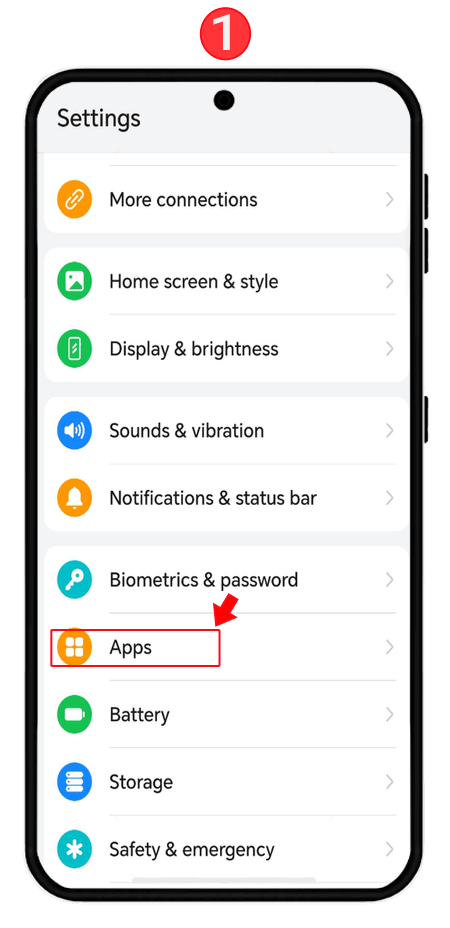

🛠️ How to Fix the White Screen the Right Way
The correct fix focuses on permissions, not reinstallations. Start by opening your Android settings and navigating to the section usually labeled “Apps,” then “Special app access,” and then “Appear on top” or “Draw over other apps.” This menu lists all apps that are allowed to create overlays.
Temporarily disable overlay permission for apps such as screen recorders, chat heads, launchers with floating widgets, blue light filter apps, password managers, and system optimizers. Once these permissions are disabled, fully close Facebook and reopen it. In many cases, the feed appears instantly, confirming the diagnosis 🔧.
If disabling overlays one by one feels tedious, a practical test is rebooting the device into safe mode. Safe mode disables third-party overlays entirely. If Facebook works normally in safe mode, the cause is confirmed without any guesswork.
📊 A Real-World Example That Makes It Click
In one real diagnostic case, a user experienced a white screen only on Facebook, while all other apps worked normally. The cause turned out to be a floating battery monitor that displayed real-time usage as an overlay. Disabling that single permission restored Facebook immediately. The user described it as “Facebook suddenly remembering how to load,” which is exactly what happens when the system allows rendering again 😊.
📈 A Metaphor That Explains the Behavior Instantly
Imagine trying to paint on a wall while someone has placed a transparent sheet over it. You can move your brush, but the paint never touches the wall. Screen overlays act like that transparent sheet. Facebook is painting, but Android never lets the paint reach the screen 🎨🪟.

❓ Frequently Asked Questions (FAQ)
- Why does Facebook show only a white screen?
Because Android is blocking UI rendering due to an overlay conflict. - Is this caused by a Facebook update?
Indirectly, updates can trigger stricter security checks. - Does reinstalling Facebook help?
Usually no, because the problem is outside the app. - Can screen recorders cause this?
Yes, they are one of the most common triggers. - Do chat heads or bubbles matter?
Yes, they rely on overlay permissions. - Is this an Android-only issue?
Primarily yes, due to Android’s overlay permission model. - Why don’t I see an error message?
Because Android suppresses rendering silently for security. - Does safe mode confirm the issue?
Yes, if Facebook works in safe mode, overlays are the cause. - Can accessibility apps trigger this?
Yes, especially those with screen interaction privileges. - Is this a security problem?
No, it is a security precaution working as designed.
🤔 People Also Ask
Why does Facebook load but stay blank?
Because rendering is blocked, not the app itself.
Can floating apps break Facebook?
Yes, overlays can interfere with secure UI layers.
Why does disabling one app fix everything?
Because only one active overlay is enough to block rendering.
Is this the same as a crash?
No, the app remains running.
Should I reset my phone?
No, permission adjustment is sufficient.
✅ Final Thoughts
A white screen in the Facebook app is rarely a mystery once you look at it through the lens of screen overlay permissions. Android is doing its job by protecting sensitive UI layers, and Facebook is enforcing that protection by refusing to render under risky conditions. Once the conflicting overlay is removed or disabled, the app does not need to be repaired or reinstalled. It simply starts drawing again, and when the feed finally appears, it feels less like fixing Facebook and more like removing an invisible curtain that was blocking the view all along 😌📱.
You should also read these…
- toojet.com – tiktok not working with vpn fixes
- toojet.com – my tiktok messages were deleted recovery methods
- surgeblog.com – unable to update phone number on tiktok
- sixrep.com – missing tiktok effects fix guide
- hogwar.com – cant remove tiktok family pairing
- axtly.com – the science behind why spinner wheels are so addic
- noepic.com – side hustle ideas that require minimal upfront cos
- huesly.com – losing followers on tiktok causes and fixes
- toojet.com – romantic spin the wheel activities for couples
- axtly.com – comments wont open but the post does realtime api