


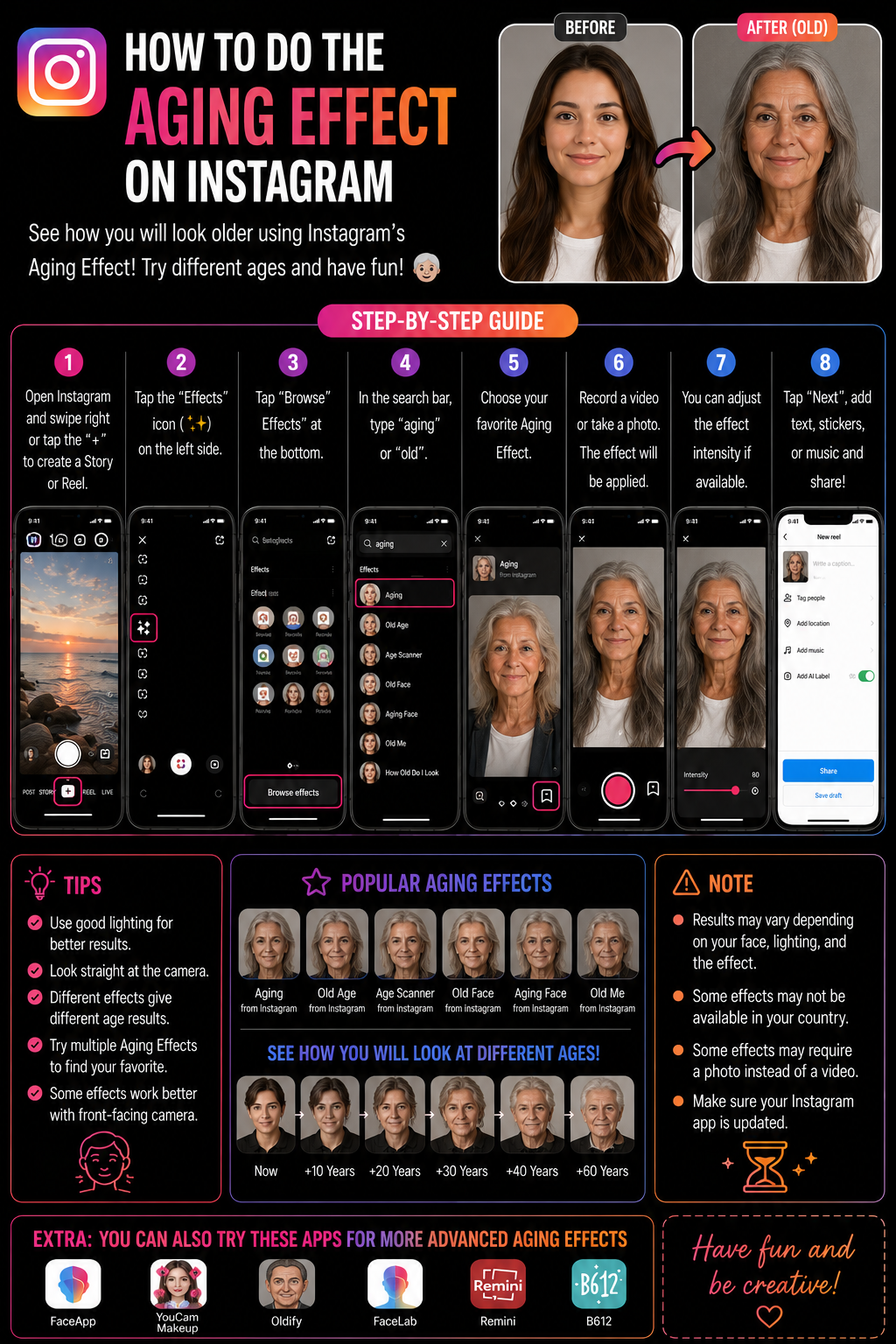
How to Do the Aging Effect on Instagram (Old Age Filter in Stories + Reels) 👴👵✨
Instagram’s “aging effect” is one of those filters that people swear was “built in,” but in reality it’s usually an AR effect that lives inside the Effect Gallery and can change name, creator, and availability over time, which is why you sometimes can’t find “the exact one” your friend used 😅. The good news is you can still do the aging effect reliably if you use the right workflow: search the Effect Gallery with the right keywords, or even better, open a Reel that already uses the effect and save it from there so you get the exact same version.
Instagram’s Help Center confirms you can add effects and filters before sharing content, including camera effects used for photos and videos, which is the foundation for all aging filters on Stories and Reels. Add effects and filters ✅
Definitions 🧠
Aging effect is an AR face effect that tracks your facial landmarks and applies an “older” look, usually wrinkles, skin texture changes, sometimes hairline changes, sometimes a subtle sagging or face-shape adjustment. Different creators publish different versions, so the look can vary a lot.
Effect Gallery is Instagram’s searchable library of effects. You reach it from the camera by tapping Browse Effects (magnifying glass) at the end of your effects tray.
Save effect bookmarks the effect so it stays in your effects tray, which is the single best way to avoid “I can’t find it again” frustration 😄.
Why Important? 🎯😄
Aging effects work because they create instant contrast. You can do “me now vs me at 70,” “me after one more deadline,” “how my friends will look after one more all-nighter,” and viewers understand the joke instantly. It’s a transformation hook, and transformation hooks are powerful because they give people a reason to watch the full clip even if it’s short.
Metaphor time: it’s like looking into a time-travel mirror 🪞⏳. You don’t need a complex story, the transformation is the story.
How to Apply ✅🛠️
Method 1: Aging effect in Instagram Stories 📸👴
1) Open Instagram and swipe right to open the Story camera.
2) Swipe through the effects at the bottom until you reach the end and tap Browse Effects (magnifying glass).
3) Tap search and try keywords like:
- aging
- old
- old age
- wrinkles
- elder
- grandma / grandpa
- age
4) Tap an effect to preview it live on your face.
5) Tap the save icon so it stays in your effects tray.
6) Record your Story, add text or stickers, and share.
This fits the general Instagram workflow for adding effects and filters during creation. Add effects and filters ✅
Method 2: Aging effect in Instagram Reels 🎬👵
1) Tap + → choose Reel.
2) Tap the Effects icon.
3) Tap Browse or search and use the same keywords above.
4) Select the aging effect, record or upload your clip, then post.
5) Save the effect for next time.
Method 3: Get the exact aging effect you saw, then save it 🔎💡
If you want the exact same look someone else used, don’t gamble with search results. Do this instead:
1) Open the Reel that has the aging effect you like.
2) Tap the effect name shown on the Reel.
3) Tap Try it or Save effect.
4) Now it appears in your tray and you can use it anytime.
This is the fastest method when names vary and effects rotate. 😄
Make It Look Better ✨
1) Use bright front lighting 💡 so wrinkles and texture look cleaner and tracking stays stable.
2) Face the camera 🙂. Strong side angles reduce face landmark accuracy.
3) Avoid stacking heavy smoothing filters because smoothing fights the wrinkle texture and can make the effect look weak.
4) Keep your background simple so the tracking focuses on your face.
5) Record short clips because tracking can drift if your device heats up.
If You Can’t Find the Aging Effect 🧯😵💫
1) Effects rotate: The exact effect might be removed or hidden. Search variants like “wrinkles” and “old.”
2) Update Instagram: Older versions sometimes show fewer effects or have broken search.
3) Restart the app: If the gallery is blank, restart, then try again.
4) Clear cache or reinstall: On Android, clear cache. On iPhone, reinstall if the effects gallery is stuck.
5) Use the effect from a Reel: This is the best workaround when search doesn’t show it.
Table 📊
| Goal | Best method | Keywords | Pro tip |
|---|---|---|---|
| Quick aging Story | Story → Browse Effects | aging, old, wrinkles | Save effect immediately |
| Reel with aging transformation | Reel → Effects search | old age, elder | Use bright lighting |
| Exact same filter as a trend | Open Reel → tap effect name | none | Save from the source |
| Effect search feels empty | Update + restart | search again | Clear cache or reinstall |
| Effect looks weak | Try different variant | wrinkles, grandma | Reduce beauty smoothing |
Diagram 🧩
Open Stories or Reels camera
        |
        v
Browse Effects (Effect Gallery)
        |
        v
Search aging / old / wrinkles
        |
        v
Preview -> Save effect
        |
        v
Record -> Post ✅
Example 😄
You want a quick Reel hook. You search “wrinkles,” choose an effect that gives clear texture, save it, then record a 6-second clip where you look at the camera, pause, then react with a smile and caption text like “me after one more deadline.” The transformation is the hook, the reaction is the payoff, and the whole thing takes under a minute.
Anecdote ☕😂
I’ve seen people get stuck because they searched “aging filter” once, found a perfect effect, didn’t save it, and the next day it was gone from their tray and buried in search results. The fix was simply saving the effect the first time. It turns a one-time find into a permanent tool, and it saves you from repeating the scavenger hunt every time 😅💛.
Personal Experience 🙂
If I want the exact trending aging look, I don’t rely on search. I find a Reel that uses the effect, tap the effect name, and save it. It’s faster and guarantees the same result.
Conclusion ✅😄
To do the aging effect on Instagram, use the Effect Gallery in Stories or Reels: open camera, tap Browse Effects, search keywords like aging, old, wrinkles, preview and save the effect, then record and post. If you want the exact same filter as someone else, open their Reel and save the effect directly from the source. Good lighting and a front-facing angle make the transformation look cleaner, and once saved, the aging effect becomes a one-tap tool you can reuse anytime. Instagram’s Help Center confirms effects and filters are added during creation, which is the core workflow behind this. Add effects and filters ✅
10 Niche FAQs 🤓✅
1) Why can’t I find the exact aging effect my friend used?
Effect names vary by creator and effects rotate. Save it from their Reel to match exactly.
2) Is the aging effect built into Instagram?
Usually it’s an effect from the Effect Gallery, not a permanent built-in filter.
3) Why does it look more realistic on some faces?
Lighting, face angle, and camera quality affect tracking and texture rendering.
4) Can I use it on a photo, not a video?
Yes, in Stories you can apply the effect and take a photo with it.
5) Why does the effect glitch around hair?
Low light and fast movement reduce tracking. Add front light and move slowly.
6) Why does the effect look too smooth?
Beauty smoothing may be fighting the wrinkle texture. Reduce smoothing or try another variant.
7) Does Instagram remove effects?
Yes, creators can delete effects or they can be removed, so saving early helps.
8) Why is Effects search blank?
App cache or network issue. Restart, update, and if needed clear cache or reinstall.
9) Can I use the aging effect in Reels drafts?
Yes. Save the effect and it will stay available while creating drafts.
10) Where is the official place to learn the basics of effects?
Instagram Help Center page on adding effects and filters. Add effects and filters
People Also Asked 🔎🙂
1) Is the aging effect the same as “young” filters?
No. Some effects age up, some age down. Search both aging and young if you want the opposite effect.
2) Why do some effects disappear after a few months?
Creators remove them or they are taken down. Save the ones you like and keep alternatives.
3) Can I combine aging with green screen?
Sometimes, depending on effect compatibility. If not, record with aging then edit separately.
4) Does the effect work on older phones?
It can, but performance may be weaker. Try a lighter variant for smoother results.
5) What’s the quickest method overall?
Save the exact effect from a Reel you like and reuse it from your tray.